HOW TO MAKE YOUR OWN FAVOURITES PAGE
Session 1
1.- Make a file called "favourites.htm".
2.- Write the initial and final codes:
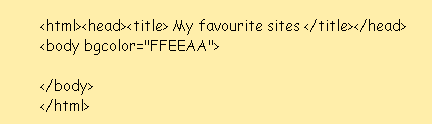
3.- Write the codes for a two-column table:
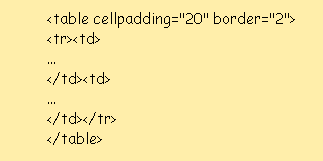
4.- Replace the three dots (...) with links to your favourite websites, starting with your current home page and the European Section website:
Link: European Section
Address: http://olmo.pntic.mec.es/~pmai0016/european_section/index.html
5.- Add some useful sites in the right-hand column (for example, a link to Google and to your e-mail server).
Link: Google
Address: http://www.google.es/
At the school:
6.- Send an e-mail to yourself, attaching your “favourites.htm” file.
At home:
7.- Add a link to your current home page.
8.- Open favourites.htm with your web browser and make it your home page.
JJCC